CpxBarometer
This widget calculates the pressure of clinopyroxene (cpx) formation using its chemical composition or the composition of clinopyroxene–liquid (cpx–liq) pairs.
The widget uses the Thermobar tool to function and requires a dataset prepared in a specific way (with specific variable labels). An example of how variables should be renamed before using the widget is shown in Table 1. More details can be found by consulting the Thermobar documentation.
Column1 |
Column2 |
Column3 |
|---|---|---|
Value1 |
Value2 |
Value3 |
As shown in the Figure, users can select whether to use barometers based on cpx composition only or on cpx–liquid pairs. For each of the two options, users can select the barometry formula that best suits their dataset via a convenient drop-down menu. If the chosen formula is temperature-dependent, the user can choose whether to (i) use temperature values found in a specific column within their dataset, (ii) enter a specific temperature to apply to the entire dataset, or (iii) calculate their own temperature from a specific model.
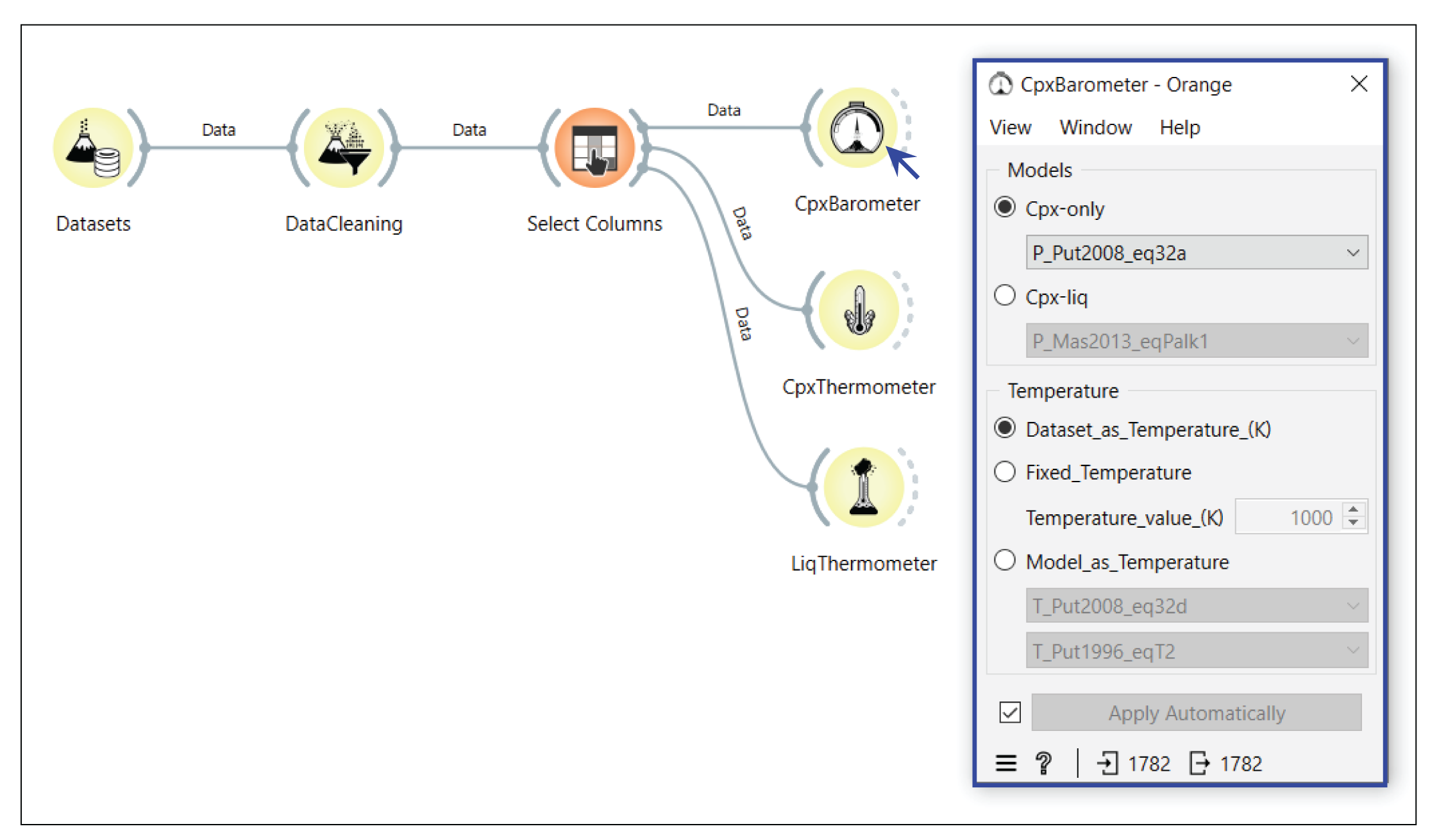
CpxBarometer. The widget interface allows users to select whether to use barometers based on cpx composition only or on cpx–liquid pairs. For each option, the appropriate barometry formula can be selected via a drop-down menu. If the formula is temperature-dependent, the user can choose between using a temperature column, entering a specific temperature, or calculating their own temperature.